M.Ross
REF: MR-USE
What it's for
Ask in plain English. M.Ross runs the tools. Treat each chat as a separate matter.
SCOPE: IN
Good for
- Remote MCP connector. Use it wherever MCP is supported; setup is optimized for Claude and Cursor.
- Situation assessment (housing, employment, IP, debt, criminal)
- Statute lookup and citation checks
- Caselaw search, opinions, and cite verification
- Federal RECAP docket lookup and details
- Drafting notices, checklists, and templates
SCOPE: OUT
Not for
- Filing with a court or agency for you
- Predicting case outcomes
- Coverage outside WA, OR, KS, FL, or Federal
- Replacing counsel on high-stakes deadlines
REF: CLIENTS
Use M.Ross in your chat app
Install Claude or Cursor, then connect with the steps below.
REF: EXAMPLES
Examples
Real Claude replies with M.Ross connected. Expand to read.
I got a 14-day pay or vacate notice in Seattle last week for unpaid rent. Assess my situation with M.Ross, give next steps, and point me to any checklist or template I should use.
Assessed a Seattle 14-day pay-or-vacate and pulled the eviction-response checklist.
This is a WA housing/eviction matter, and the connector flagged it as time-sensitive.
What the notice means
A 14-day pay-or-vacate is the standard first step for nonpayment under RCW 59.12.030(3). It is not the eviction itself. It gives you 14 days after service to either pay the full amount claimed or move out. If you do neither, the landlord can then file an unlawful detainer lawsuit. You get a separate court summons at that stage, with its own (short) answer deadline. Do not conflate the two clocks.
Your right to cure
In WA, paying the full rent stated in the notice within the 14 days stops the eviction cold. This is a statutory pay-or-cure right for nonpayment cases, so if the number is correct and you can pay, that's the cleanest resolution.
Next steps
Read the notice for the exact service date and the precise dollar amount claimed. The 14 days runs from service, not from the date printed on it.
Reconcile their number against your payment records. Landlords sometimes fold in late fees or other charges that aren't "rent" and don't belong in a pay-or-vacate. Only unpaid rent counts.
If the amount is right and payable, pay in full within the window and get written confirmation. Pay the exact rent figure, not padded fees, and keep proof.
If you dispute the amount or have a habitability/retaliation angle, document it now (conditions, prior complaints, repair requests) before any court filing.
Do not ignore a court summons if one arrives. Missing the answer deadline means a default judgment against you.
Get help fast. Washington has a right to counsel in eviction cases for low-income tenants. Contact the Northwest Justice Project (nwjustice.org/get-legal-help) or call the Eviction Defense Screening Line.
Checklist
Read the notice; note type and every deadline date Confirm exact service date and amount claimed Gather lease, payment records, repair requests, photos, all notices Nonpayment: calculate what you believe is owed vs what's claimed; keep proof Habitability/retaliation: document conditions and prior complaints before the notice Decide: cure (pay), negotiate, or answer if sued Calendar every date from the notice and any court papers Deadlines on your papers override everything here
Key statutes: RCW 59.12.030 (unlawful detainer), RCW 59.18 (Landlord-Tenant Act). Resources: Washington LawHelp — Eviction, Northwest Justice Project, WA Courts Eviction Guide.
01
Get invited
The owner sends invites by email. Each invite is tied to that address. No public signup. Ask someone who already has access to send you an invite.
02
Join
03
Cursor
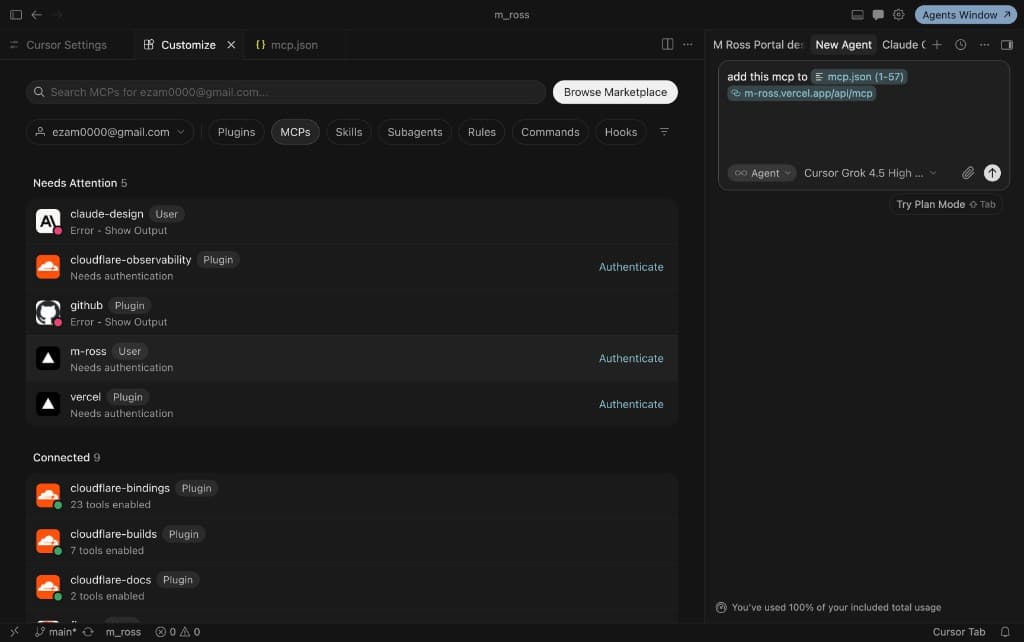
Click Add to Cursor. Install when Cursor asks, then Authenticate and Allow with your invite email.
Add to CursorIf Cursor shows Needs authentication:
01 · Authenticate
1 / 2
04
Claude
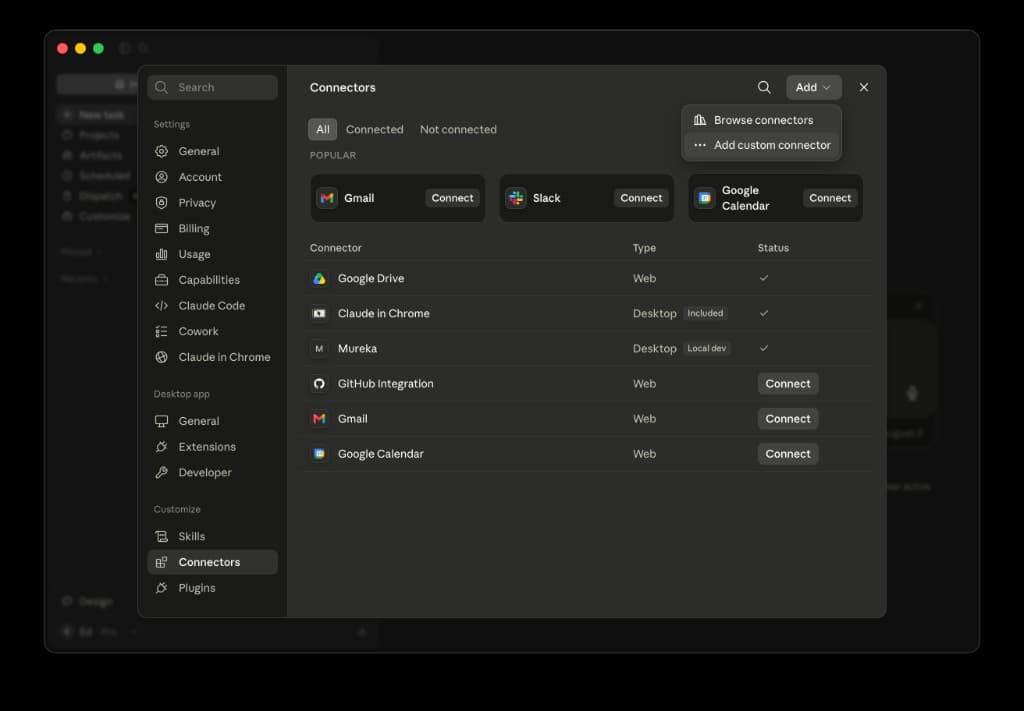
Settings → Customize → Connectors → Add → Add custom connector. Paste this connection address: https://mross.evergreenlab.co/api/mcp. Sign in with your invite email, then Allow.
01 · Add custom connector
1 / 5
05
After an M.Ross update
After an M.Ross update
Claude
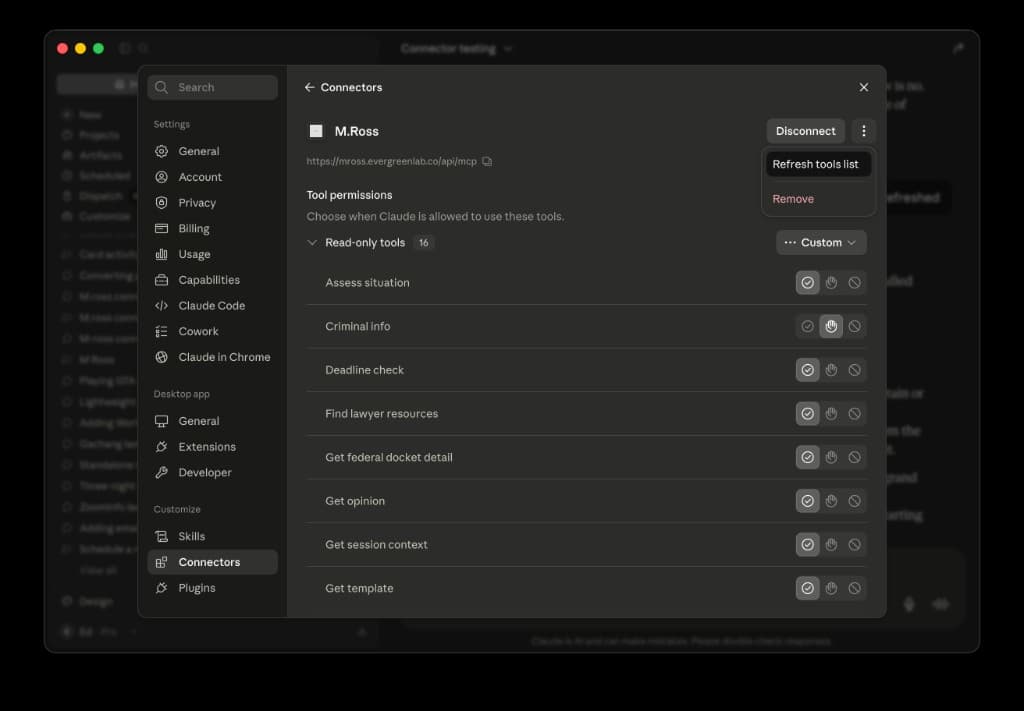
- When M.Ross adds or changes tools, open Settings → Customize → Connectors.
- Select M.Ross → ⋮ menu → Refresh tools list.
01 · Refresh tools list
1 / 1
Cursor
- When M.Ross adds or changes tools, fully quit Cursor (not just close the window) and reopen it.
- MCP settings refresh alone does not pick up new tools.